
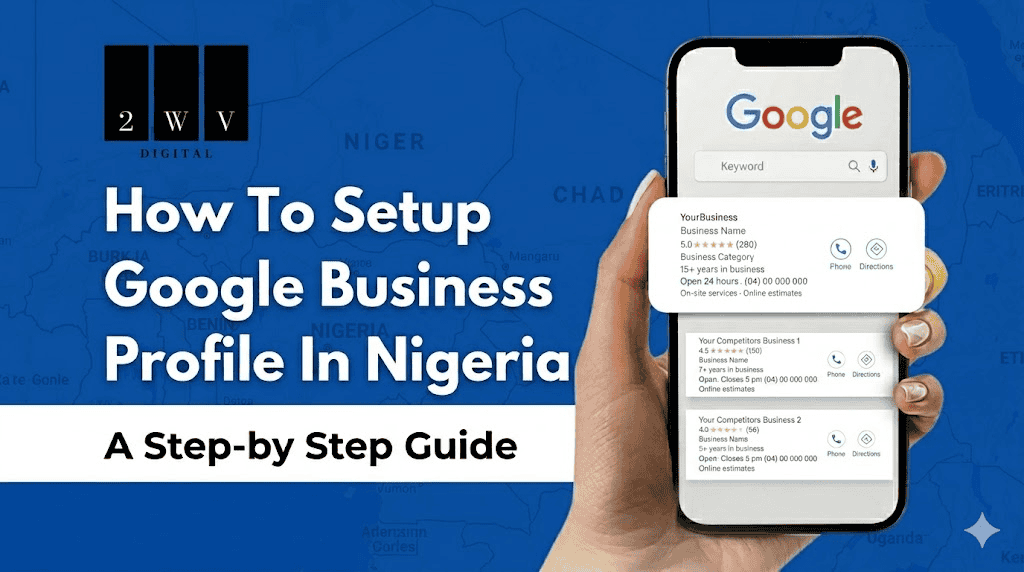
Setting up a Google Business profile in Nigeria is one of the free digital marketing strategies for Nigerian Businesses, a well-optimized profile will help your business to appear on both Google search and Map and ensure you generate leads and grow sales online within your local area.
A GBP present small business with an unfair advantage, allowing them to compete with bigger brands, but sadly, many of them are still ignorant of this powerful tool. Your competitors don’t just have their business profile on Google but are actively using it to snath your customers
The good news is that, in this comprehensive article, we will breakdown the entire process of setting up a Google Business Profile in Nigeria, including different verification methods and optimization strategies.
What Is a Google Business Profile?
A Google Business Profile (formerly Google My Business) is a free tool from Google that lets businesses control how they appear in Google Search and Google Maps. When someone searches for your business by name or looks for services in your area, your Google Business Profile is what shows up, displaying your address, phone number, photos, reviews, opening hours, and a link to your website.
It is essentially your free online storefront on Google. And for Nigerian businesses, it is one of the most powerful local marketing tools available because it puts you directly in front of people who are already searching for what you sell.
Here is why it matters specifically in Nigeria:
Thousands of Nigerians use Google daily on their smartphone to find local businesses. When someone searches “plumber shop Surulere” or “catering services in Uyo,” Google shows a map with three local businesses before showing any website links. That map section is called the Local Pack, and is powered entirely by Google Business Profiles.
Without having a GBP, you will never be found in those results even if your products is the best in the world.
A Google Business Profile is also not a replacement for a website. They work together. Your GBP handles local discovery and first impressions. Your website handles deeper trust-building, detailed information, and actual conversions. Nigerian businesses that have both consistently outperform those with only one. If you do not have a professional website yet, read our guide on website design in Nigeria to understand what it costs and what to look for.
What You Need Before You Start
Before you begin the setup, gather the following. Having everything ready saves time and prevents errors that could delay verification.
- A Google account. You can use your personal Gmail, a business email from Google or your custom business email.
- Your exact business name. Use your name exactly as it appears on your signage, CAC certificate, or receipts. Using a different name will violate Google’s guidelines and lead to the suspention of your profile.
- A physical address or service area. For businesses with a shopfront or office, you need your full street address. For home-based or mobile businesses (delivery services, photographers, event planners, plumbers), you will set a service area instead and can hide your home address from the public profile.
- A working phone number. A foreign number is not allowed, only a real Nigerian number starting with +234 followed by the remaining digits. Use the same number across your website, social media, and Google listing.
- Your website URL. If you have one, include it. If you do not, leave it blank for now and add it later. This is also one of the reasons having a business website matters for local SEO.
- At least 5 photos ready. Exterior of your business, interior, your products or services, and your team if applicable. Real photos, not stock images. Google rewards listings with genuine visual content.
- Your business hours. Including weekends and public holidays. Inconsistent or wrong hours frustrate customers and hurt your ranking.
How To Setup A Google Business Profile in Nigeria: Step by Step
Step 1: Go to business.google.com and sign in
Open your browser and navigate to business.google.com and Sign in with the Google account you want linked to your business. If you manage multiple businesses or plan to work with a digital agency, use a dedicated business Google account rather than your personal Gmail. This makes access management cleaner.
Step 2: Click “Add your business to Google”
Once logged in, click the button that says “Add your business to Google.” Before you create a new listing, Google will search to see if your business already exists. Type your business name in the field and check the results carefully.
If your business appears in the suggestions, it means someone has already created an unverified listing, possibly Google auto-generated it from web data. Click “Claim this business” and proceed through the steps to take ownership. If your business does not appear at all, select “Create a business with this name” and continue.
Step 3: Select your business category
This is one of the most important decisions in the entire setup process and most Nigerian business owners get it wrong.
Your primary category tells Google what type of business you are and determines which local searches you are eligible to appear for. Choose based on what your customers actually type when searching, not internal industry labels.
“Restaurant” beats “Culinary Establishment.” “Hair Salon” beats “Beauty Services Provider.” “Electrician” beats “Electrical Installation and Maintenance Contractor.”
You can add secondary categories after setup. Start with the one that best describes your core service.
Step 4: Add your location or service area
This step works differently depending on how your business operates.
If you have a physical location where customers can walk in, enter your full address. Include building number, street name, area, and city. If your area does not have a formal street number (common in many parts of Nigeria), add a well-known landmark in parentheses. For example: “12 Opebi Road (opposite Sterling Bank), Ikeja, Lagos.” This helps Google confirm your location and helps customers find you.
If you are a home-based or mobile business (photographer, caterer, event planner, delivery service, plumber, etc.), select “I deliver goods and services to my customers.” You will then set your service area by city, state, or specific areas. You can fully hide your home address from your public listing. Google still needs it for verification purposes, but it will not show publicly.
Be realistic about your service area. If you only serve Victoria Island and Lekki, do not claim all of Lagos. Google tracks this, and overstating your service area can hurt your local relevance.
Step 5: Add your phone number and website URL
Enter your primary Nigerian business phone number. Include your website URL if you have one. Make sure the website loads correctly and is not under construction. An inactive or broken link on your Google listing is a bad look and can affect how seriously Google treats your profile.
If you do not have a business website yet, this is a good time to think about getting one. A Google Business Profile is powerful, but a website gives you a space you fully own and control where customers can learn more, trust you more, and take action. See our breakdown of website design costs in Nigeria if you are considering it.
Step 6: Verify your business
This is the step where most Nigerian business owners get stuck. We have dedicated a full section to verification below because it deserves detailed attention.
After entering your information, Google will prompt you to verify. Do not skip this. Your listing will not appear in full search results or on Google Maps until verification is complete.
Step 7: Complete your profile
Once verification is done or in progress, complete every remaining field in your profile:
- Business description (up to 750 characters)
- Products or services with individual names, descriptions, and prices
- Photos (aim for at least 10 to 15)
- Opening hours including public holidays
- Attributes relevant to your business (wheelchair accessible, free Wi-Fi, etc.)
- Questions and answers (you can add your own FAQs proactively)
A fully completed profile ranks higher in local search results than an incomplete one. Google interprets completeness as a trust signal.
How To Verify Your Google Business Profile in Nigeria
Verification is what separates a live, visible listing from one that sits in limbo. Until Google confirms that your business is real and that you are the legitimate owner, your profile will not appear properly in search results or on Google Maps.
This is also where Nigerian businesses face a unique challenge. The postal service (NIPOST) is unreliable in many parts of Nigeria, which means the traditional postcard verification method often fails. Here is a full breakdown of every option available and what to expect from each.
Method 1: Video Verification (Recommended)
Video verification is the most practical and reliable method for Nigerian businesses in 2026. Google asks you to record a short video showing that your business is real and operating at the location you specified.
Your video should show:
- Your business exterior with visible signage (or your residential area if home-based)
- The interior of your business, including products, workspace, or equipment
- Any business documents visible in the background such as a CAC certificate, product displays, or branded materials
Record in good lighting. Keep the camera steady. You do not need to speak on camera. Submit the video through your GBP dashboard and Google typically reviews it within 3 to 5 business days. You will receive a notification when the decision is made.
Method 2: Phone Verification
Google sends a 5-digit verification code via automated phone call or SMS to your listed business number. When this option is available, it is the fastest method: enter the code immediately and your listing is verified in minutes.
Phone verification is not always offered. Whether it is available depends on your business type, location, and account history. Check your dashboard when you initiate verification to see if it appears.
Method 3: Email Verification
Google sends a verification code to the email address linked to your website domain. This is why having a professional business email such as info@yourbusiness.com.ng matters beyond just looking professional.
If you are setting up hosting for your business, most web hosting packages in Nigeria include business email through cPanel. Our guide to cheap web hosting in Nigeria covers which providers offer this and what to expect cost-wise.
Method 4: Postcard Verification
Google mails a physical postcard to your business address containing a 5-digit code. In Lagos and Abuja, expect the postcard to arrive in 2 to 4 weeks. In other states, delivery can take longer or may not happen at all.
If you opt for this method:
- Make sure your address is as complete and precise as possible before requesting the postcard
- Do not change your business name, address, or category while waiting. Any edits will invalidate the code
- Do not request multiple postcards in quick succession. Each new request cancels the previous code
- If the postcard does not arrive within 14 days, request a new one from your dashboard
- Never create a second listing while waiting. That violates Google’s guidelines and risks suspension of both listings
Method 5: Instant Verification via Google Search Console
If your business website is already verified in Google Search Console using the same Google account you are using for your Business Profile, Google may verify your listing instantly without any additional steps.
To take advantage of this, set up Google Search Console verification on your website before creating your GBP. Log in at search.google.com/search-console and add your website property. When you then create your Business Profile with the same account, instant verification may be offered automatically.
What if none of these options work for you? If Google only shows postcard as an option and it has not arrived after 14 days, try: logging out completely and logging back in on a different device or browser; ensuring your profile is fully filled out before requesting verification again; switching to a different browser entirely; and contacting Google Business Profile support directly using the “Get Help” option in your dashboard. Never create a duplicate listing for the same business. That path leads to suspension.
How To Optimize Your Google Business Profile After Setup
Setting up and verifying your profile is only the first step. The Nigerian businesses that consistently show up at the top of Google Maps results are not just verified. They are actively managed. Here is what that looks like in practice.
Write a Business Description That Actually Works
Your description allows up to 750 characters. Use the first 250 strategically because that is what shows before the “More” button. Include your primary service, your city or state, and what genuinely makes you different from competitors.
Do not keyword-stuff. Do not copy your website’s About page. Write it the way a customer would describe your business to a friend.
A solid example for a Lagos-based web design agency:
“Lagos-based web design agency helping small businesses across Nigeria get professional websites that attract customers and generate sales. We build WordPress websites, run Facebook and Instagram ads, and handle SEO content for Nigerian SMEs. Based in Ikeja with clients across Lagos, Abuja, and Port Harcourt.”
Upload Photos That Build Trust
Listings with photos receive 42% more direction requests and 35% more website click-throughs than those without. Upload:
- Profile photo: your logo at 400x400px minimum
- Cover photo: your best product shot or a professional team photo at 1024x576px (16:9 ratio)
- Interior shots showing your workspace or shop
- Exterior shots so customers can find you physically
- Product or service photos showing your actual work
- Team photos showing the people behind the business
Aim for at least 10 to 15 photos. Add a short 30-second video walkthrough of your business if possible. Real photos consistently outperform stock images in both engagement and trust signals.
Add Your Products and Services
Under the Products or Services tab, add individual items with names, descriptions, and prices in Naira. This creates additional indexed content for your listing and helps customers understand exactly what you offer before they even contact you. It also gives Google more context to match your listing to specific service searches.
Post Regular Updates
Google Business Profile has a Posts feature that functions like a mini social feed attached to your listing. Post at least once a week. Types of content that work well:
- Current offers or promotions with a start and end date
- New products or services you have added
- Business updates (new location, new hours, new staff)
- Tips related to your industry
Posts expire after 7 days for Offer posts and stay up longer for regular updates. Active posting signals to Google that your business is operating and engaged, which feeds into your local ranking.
Collect and Respond to Google Reviews
Reviews are the single most impactful local ranking factor after proximity and relevance. The businesses in the top 3 spots on Google Maps almost always have more reviews and a higher average rating than those below them.
Ask every satisfied customer to leave a Google review. Make it easy by sharing a direct link to your review page (you can find this in your GBP dashboard under “Get more reviews”). WhatsApp the link to customers after a completed job. Add it to your email signature.
Respond to every review, positive or negative, within 48 hours. A business owner who responds to reviews signals credibility and professionalism. For negative reviews, stay calm and factual. Address the concern directly without being defensive. One bad review handled well does less damage than a long list of unanswered negative feedback.
Enable Messaging
In your GBP settings, switch on the messaging feature. Customers can send you a direct message from your Google listing without needing to call or visit your website first. Given how dominant WhatsApp and chat-based communication are in Nigeria, removing the friction of a phone call can meaningfully increase the number of leads you get from your listing.
Monitor Your Insights Monthly
Your GBP dashboard gives you real data on:
- How many people searched for your business by name versus finding you through a category search
- Whether they found you on Google Search or Google Maps
- What actions they took: calls, direction requests, website visits
- Which photos are getting the most views
- How many times your listing appeared in results
Check this monthly. If a certain type of photo gets high engagement, upload similar ones. If direction requests are high but calls are low, your phone number or call-to-action may need to be more visible. Let the data guide your next moves rather than guessing.
7 Common Mistakes Nigerian Businesses Make With Google Business Profile
Most existing guides cover the setup steps. Very few talk about what goes wrong after setup. These are the mistakes that cost Nigerian business owners visibility, customers, and in some cases, their entire listing.
1. Keyword-stuffing the business name. “Adaeze Hair Salon Best Braids Weaves Lekki Lagos” will get your listing suspended. Use only your real business name exactly as it appears on your signage or CAC certificate. Google’s algorithm for detecting name violations has become significantly stricter in recent years.
2. Using a personal Gmail to manage the listing. This creates real problems when you hire staff, bring on a marketing agency, or need to transfer ownership. Create and use a dedicated business Google account from day one.
3. Setting up and forgetting. An inactive Google Business Profile signals to Google that the business may no longer be operating. Inactive profiles rank lower and are sometimes marked as “permanently closed” by Google based on user reports. Post at least once a week and respond to reviews promptly.
4. Using a P.O. Box as your business address. Google does not accept P.O. Boxes for verification. If you do not have a permanent business address, use your home address (which can be hidden publicly) or a registered virtual office address with a real physical location.
5. Inconsistent NAP across platforms. NAP stands for Name, Address, Phone. If your business name on Google says “Lagos Web Design Co” but your website says “Lagos Web Design Company Ltd,” that inconsistency weakens your local SEO authority. Keep everything identical across Google, your website, your social media profiles, and any online directories.
6. Not uploading enough photos. Listings with fewer than 5 photos rank lower and convert worse. Aim for 15 to 20 real photos minimum. If your listing looks visually empty, customers assume the business is new, small, or not worth their time.
7. Ignoring the Questions and Answers section. Anyone can post a question on your Google listing and anyone, including strangers, can post an answer. If you leave this section unmonitored, wrong information can appear on your profile. Check it regularly and add your own FAQs proactively before customers need to ask them.
Ready To Get More Customers From Google?
At 2WV Digital, we help Nigerian small businesses set up, verify, and optimize their Google Business Profiles as part of our local SEO and website design packages. If you want your business showing up on Google Maps and in local searches without spending hours figuring it out yourself, let us handle it.
We also build the kind of professional websites that make your Google Business Profile work harder, because when customers click through from your Google listing, the website they land on either closes the sale or loses it. Read about why every Nigerian small business needs a website and 10 free digital marketing strategies for Nigerian businesses to understand the full picture.
Chat with us on WhatsApp or view our services to get started.
Frequently Asked Questions
Is Google Business Profile free in Nigeria?
Yes, Google Business Profile is completely free for all businesses in Nigeria. There are no setup fees, monthly charges, or hidden costs. Google provides this as a free service to help businesses appear in local search results and on Google Maps. You will only incur costs if you choose to run paid Google Ads alongside your organic listing, which is entirely optional and separate from the profile itself.
How long does Google Business Profile verification take in Nigeria?
Verification time depends on the method chosen. Video verification typically takes 3 to 5 business days after submission. Phone and email verification, when available, are near-instant. Postcard verification is the slowest option, usually 2 to 4 weeks in Lagos and Abuja, and can take significantly longer in other states, with no guarantee of delivery due to NIPOST reliability challenges. Video verification is the most recommended method for Nigerian businesses in 2026.
Can I create a Google Business Profile without a physical address in Nigeria?
Yes. If you operate as a service-area business, for example a plumber, event photographer, caterer, or delivery service, you can set up a Google Business Profile without displaying a public address. Select “I deliver goods and services to my customers” during setup, define your service area by city or state, and choose to hide your home address from the public listing. Google still requires a physical mailing address internally for verification purposes, but it will not appear on your public profile.
What is the difference between Google Business Profile and Google My Business?
They are the same product. Google renamed “Google My Business” to “Google Business Profile” in November 2021. The rebranding was part of a move to manage business listings directly through Google Search and Google Maps rather than through a separate dedicated app. If you see either name used online, they refer to the same free tool for managing how your business appears on Google.
Why is my Google Business Profile not showing up on Google Maps in Nigeria?
The most common reasons are: the profile has not been verified yet; the profile is incomplete (missing category, address, or phone number); the business is too new for Google’s algorithm to have built enough trust signals; or the business is simply too far from the location of the person searching. To accelerate visibility, ensure your profile is fully verified and complete, upload at least 10 genuine photos, collect your first 5 reviews, and post updates weekly. Consistency over 4 to 6 weeks typically produces noticeable improvement in local ranking.
Can I manage my Google Business Profile from my phone in Nigeria?
Yes. You can manage your Google Business Profile directly from the Google Maps app or Google Search app on Android or iOS. Search for your business name while signed into your Google account and management options will appear at the top of the results. From your phone you can respond to reviews, add photos, create posts, update hours, and edit your business information without needing a computer.
How many Google Business Profile listings can one business have?
A single business should have only one Google Business Profile per physical location. If you have multiple branches in different cities, for example one in Lagos and one in Abuja, you can and should create separate listings for each location. Service-area businesses that cover multiple cities should still maintain only one profile. Creating duplicate listings violates Google’s guidelines and can result in suspension of all listings associated with your account.
Does a Google Business Profile replace a website?
No, and this is an important distinction. A Google Business Profile and a website serve different purposes and work best together. Your GBP handles local discovery and the first impression. Your website handles deeper trust-building, detailed information, and sales conversion. Nigerian businesses that have both a complete Google Business Profile and a professional website consistently outperform those with only one or the other. If you are ready to build a website that works alongside your Google listing, see our website design packages to understand what is right for your business size and budget.
Conclusion
Setting up your Google Business Profile in Nigeria is one of the highest-ROI actions you can take for your small business today. It is free, it works around the clock, and it puts your business directly in front of people who are actively looking for what you sell.
One last thing worth repeating: a Google Business Profile is most powerful when paired with a professional website and a broader digital marketing strategy. If you want help with any part of that, from building the website to running the ads, the team at 2WV Digital works specifically with Nigerian small businesses to make this happen. You can start the conversation on WhatsApp today.
Published by 2WV Digital | Lagos-based website design and digital marketing agency serving Nigerian businesses. For enquiries: info@2wvdigital.com.ng | +2349034639354