
Are you looking for reliable web hosting that won’t double your bill next year? For many Nigerian bloggers and entrepreneurs, international hosting often feels out of reach due to fluctuating exchange rates and card limits.
InterServer has become a favorite in the Nigerian tech community specifically because of its “Price Lock Guarantee”—the price you pay today is the price you pay for life. This guide explains exactly how to navigate the purchase process from Nigeria in 2026.
If you are Nigerian looking to get a hosting service that can power your website project, there is something reliable for you and in this blog post, we will explain how to buy Interserver web hosting from Nigeria.
Why Choose InterServer Hosting in Nigeria?
Unlike major competitors that offer 70% discounts for the first year and then triple the price on renewal, InterServer offers a transparent, stable model.
- Affordability: InterServer offers a competitive, low-cost hosting plan starting from $2.50 and there is no high renewal price which is very common in the industry.
- Price Lock Guarantee: Your renewal rate will not increase as long as you keep your account active.
- Unlimited Webhosting: Their standard hosting includes unlimited ULTRA SSD storage, bandwidth, and unlimited email accounts, free SSL Certificate, Global Content Caching for fast speed and 30 days Moneyback Guarantee making it suitable for growing websites.
- Performance & Speed: Uses LiteSpeed Web Server, Cloud Linux OS, and fast SSD storage to ensure fast page loads and high uptime.
- Security Features: Includes InterShield protection to block attacks, along with free SSL certificates, automated virus scanning, and a built-in firewall.
- Free Migration: If you are currently with a local host like Whogohost or Truehost and want to move, InterServer’s team will migrate your site for free.
Pre-Requisites: What You Need Before You Start
Before starting your order, ensure you have the following ready:
- A Professional Email: This will be your primary login and where your cPanel details are sent.
- A Domain Name: You can buy a new one (typically around $12/year for .com) or use an existing one
- A Working Payment Method: Because InterServer bills in USD, you need a card that supports international transactions.
How to buy InterServer Web Hosting in Nigeria
Step 1: Select your preferred Hosting Plan
Visit the InterServer homepage and select a Web Hosting package.
NOTE: We recommend their Standard Hosting Plan, For most Nigerian websites, this plan is sufficient as it offers unlimited resources.
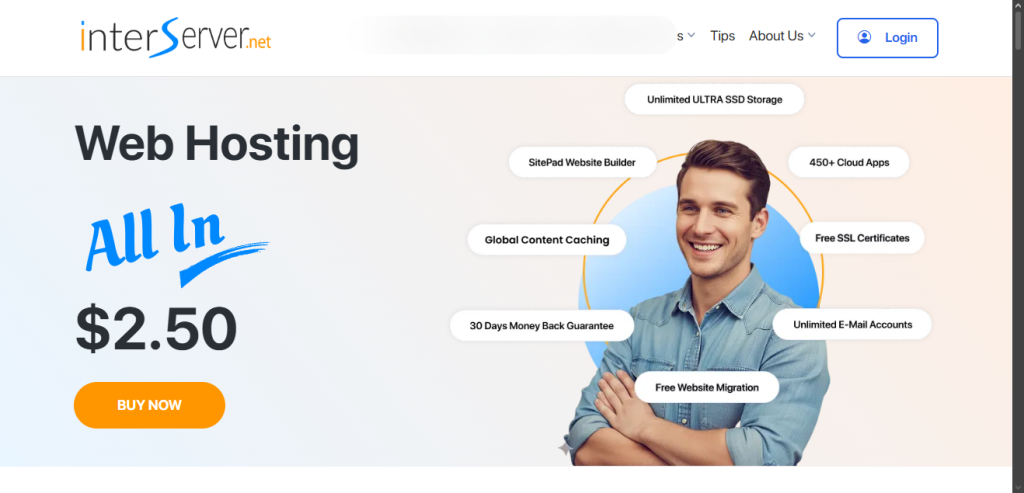
Click the Get Started button and on the next page, you will create account by provide the following details:
- A domain name (New or existing)
- Email address
- Personal details (full name, house address phone no)
NOTE : The standard web hosting plan is $2,50 for first month and renews at $7, however, you can go for plans with longer validity: 6 months $15, 12 months $30while 24 months is $60.
Step 3: Choose Payment Method
InterServer only accept payment in US dollars and there is option to pay with Paypal and crypto. Nigerians can make payment using either Visa or MasterCard, ensure your bank card support International transactions.
Nigerian Bank Cards that allow International Payment (As of 2026):
- UBA (United Bank for Africa): UBA Naira Mastercard, Visa Classic, and premium cards (Gold, Platinum) are enabled for international transactions.
- Wema Bank (ALAT): Wema Naira Mastercards/Visa cards are active for global online, POS, and ATM use.
- GTBank (Guaranty Trust Bank): Naira MasterCard, often with a quarterly cap of around $1,000, though this may change based on liquidity.
- FirstBank: Naira MasterCard offers international access, with reported quarterly caps of around $10,000 for web/POS and lower limits for ATM.
- FCMB (First City Monument Bank): Naira MasterCard and VISA Cards can be used globally, including for international online shopping.
- Zenith Bank: Provides international capability on Visa cards, allowing online and POS transactions.
Step 4: Complete Payment
Once payment is successful:
- You will receive a confirmation email
- Your hosting account will be activated
This usually happens within a few minutes
Common Problems Nigerians Face (And Solutions)
Payment Declined
- Use a virtual dollar card
- Confirm international payments are enabled
Slow Website Speed
- Install a caching plugin
- Use a CDN like Cloudflare
Confusion During Setup
- Follow the steps carefully
- Or get professional help
Pro Tip Before You Proceed
Buying hosting is just the first step.
Most websites fail not because of hosting, but because:
- Poor design
- No SEO structure
- Slow performance setup
Want a Website Set Up the Right Way?
At 2WV Digital, we help you:
- Set up your hosting properly
- Design a professional website
- Optimize it for speed and Google ranking
If you want to avoid trial and error, reach out and let’s build your website the right way.
Affiliate Disclosure: This blog post contain affiliate links, if you click and make a purchase, we earn a commission at no extra cost to you.